New User Rights for Unit Data Isolation: KanAdministrereEnhed, KanFrav, and KanLoen
In order to maintain the isolation of unit (enhed) data, three new user rights have been introduced. These rights can be granted to regular users who do not hold global roles, such as Admin, FravBruger, LoenBruger, but need to perform administrative functions within their own unit.
We refer to the section Enhedsrettigheder in the document Roller og rettigheder(Quickguide) regarding the existing unit rights.
The new rights are:
KanAdministrereEnhed: This right allows a user to access the following pages:
- Admin → Brugere → Bruger
(URL: /Admin/Users) - Admin → Registreringer → Emne (
URL: /Admin/Registration) - Registreringer → Fraværsliste
(URL: /registration/AbsenceList)
- Admin → Brugere → Bruger
KanFrav: This right grants a user access to the following pages:
- Admin → SLS → Oversæt til SLS
(URL: /Admin/SLSAbsenceCodes) - Admin → SLS → Fravær Kontrolark
(URL: /Admin/SLSFrav)
- Admin → SLS → Oversæt til SLS
KanLoen: This right enables a user to access:
- Admin → Moduler → SLS Engangsløndele Eksport
(URL: /salaryIncrement)
- Admin → Moduler → SLS Engangsløndele Eksport
Users with these three rights will not be able to view other units’ personal data on the pages above.
The rights can be granted on the page Admin → Enheder → Enhedsrettigheder:

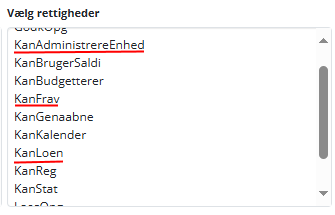
Users with the ‘KanAdministrereEnhed’, ‘KanFrav’ and ‘KanLoen’ unit-level rights can perform all the actions that users with the ‘Admin’, ‘FravBruger’ and ‘LoenBruger’ global-level roles can perform on the above pages. The only difference is that the scope is filtered by the user’s unit (enhed). This is achieved using a filter to ensure that only users from the manager’s own unit are affected. The filter is implemented by adding an additional WHERE clause to SQL and LINQ statements when data are retrieved from the database.
Source: Confluence | Page ID: 795410433